













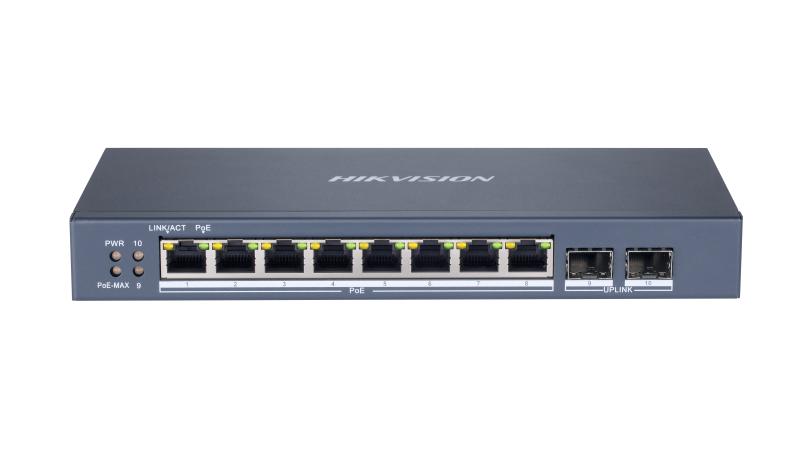

სვიჩი POE DS-3E1510P-SI


პროდუქტის აღწერა
8-პორტიანი გიგაბიტიანი სმარტ PoE სვიჩი (ოპტიკური პორტებით)
- პორტები: 8 × გიგაბიტიანი PoE პორტი და 2 × გიგაბიტიანი ოპტიკური (Fiber) პორტი. ოპტიკური პორტები საშუალებას გაძლევთ დაუკავშირდეთ სხვა სვიჩს ან ჩამწერს დიდ მანძილზე სიგნალის დაკარგვის გარეშე.
- PoE სტანდარტი: მხარს უჭერს IEEE 802.3at/af სტანდარტებს, რაც ნიშნავს, რომ მას შეუძლია კვება მიაწოდოს თითქმის ყველა თანამედროვე IP კამერას.
- ჭკვიანი მართვა: ქსელის ტოპოლოგიის მართვა, განგაშის შეტყობინებები (Push) და ქსელის მდგომარეობის მუდმივი მონიტორინგი.
- დაცვა: 6 KV ელექტროგამძლეობა (Surge Protection) PoE პორტებისთვის, რაც იცავს მოწყობილობას ძაბვის ცვალებადობისა და მეხისგან.
- შორი მანძილის გადაცემა: "Extend" რეჟიმში AF/AT კამერებთან კავშირი შესაძლებელია 300 მეტრამდე მანძილზე.
- PoE Watchdog: ინტელექტუალური ფუნქცია, რომელიც ავტომატურად აფიქსირებს "გაჭედილ" კამერას და გადატვირთავს მას კვების რესტარტით.
- Layer 2 მართვის პროტოკოლები: მხარს უჭერს პროფესიონალურ ფუნქციებს, როგორიცაა:
- VLAN: ქსელის ვირტუალური დაყოფა.
- STP/RSTP: ქსელური მარყუჟების (Loops) პრევენცია.
- Link Aggregation: პორტების გაერთიანება სიჩქარის გაზრდისთვის.
- QoS: ვიდეო ტრაფიკის პრიორიტეტიზაცია შეუფერხებელი გამოსახულებისთვის.
ტექნიკური დეტალები
- General
- ShellMetal material
- Net Weight1.21 kg (2.67 lb)
- Gross Weight1.3 kg (2.87 lb)
- Dimensions (W × H × D)217.60 mm × 27.80 mm × 108.55 mm (8.57'' × 1.09'' × 4.27'')
- Operating Temperature0 °C to 40 °C (32 °F to 104 °F)
- Storage Temperature-40 °C to 85 °C (-40 °F to 185 °F)
- Operating Humidity5% to 95% (no condensation)
- Relative Humidity5% to 95% (no condensation)
- Power Supply48 VDC, 2.5 A
- >span class="tech-specs-items-description__title-details">Desk-Mounted,Wall-Mounted
- Max. Power Consumption120 W
- Power Consumption in Idle7 W
- Surge Protection6 KV
- Network Parameters
- Ports8 × Gigabit PoE port,2 × Gigabit fiber optical port
- MAC Address Table8 K
- Switching Capacity20 Gbps
- Packet Forwarding Rate14.88 Mpps
- Internal Cache4.1 Mbits
- PoE Power Supply
- PoE StandardIEEE 802.3af,IEEE 802.3at
- PoE Power PinEnd-span: 1/2(+), 3/6(-);
- PoE PortPoE: Ports 1 to 8
- Max. Port Power30 W
- PoE Power Budget110 W
- Software Function
- Long Range
Ports 1 to 8: up to 300 m.
Long range performance may vary depend on camera model or cable condition.
- Port Isolation
Ports 1 to 8: port isolation mode to improve network security.
Ports in an isolation group cannot communicate with each other, but they can communicate with ports outside the isolation group.
- PoE WatchdogPorts 1 to 8: auto detect and restart the cameras that do not respond.
- Link Aggregation
Link aggregation is used to aggregate multiple physical ports to form a logical port for load balancing, bandwidth expansion, and port protection.
Support static link aggregation.
Support 8 aggregation groups.
- Loop Prevention
Loop prevention is used to prevent the switching network from forming loops, which will seriously affect network communication. Disabled by default.
Support 802.1D STP.
- QoS
QoS is used to allocate bandwidth to different services so as to provide end-to-end service quality assurance.
Support port-based priority configuration.
Support SP, WRR priority schedule mode.
- VLAN
VLAN is used for network scale planning and network health improvement.
Support 802.1Q.
Configurable VLAN ID from 1-4094.
Support Trunk, Access port mode.
Support Max. 4094 VLAN.
- HPP
Support one-click activation and remote management via Hik-Partner Pro. Functions supported:
1. Display the port rate.
2. Display the port bandwidth utilization rate.
3. Display the PoE power usage.
4. Display topology information.
5. Display the alarm status.
6. Restart ports and devices.
7. Enable port long-rage mode.
8. Remotely upgrade the device.
- System MaintenanceRemote upgrade, default parameters recovery, logs viewing, basic network parameters configuration, import and export configuration, time sync
- Port Rate-LimitingPort rate-limiting is used for port bandwidth adjustment to prevent network congestion.
- Storm Control
Storm control is used to prevent switch ports from being blocked by broadcast or multicast storms in the LAN, which may affect network communication.
Support port rate limiting based on broadcast, multicast, and unknown unicast packets.
- Approval
- EMC
FCC (47 CFR Part 15, Subpart B);
CE-EMC (EN 55032: 2015, EN IEC 61000-3-2: 2019, EN 61000-3-3: 2013+A1: 2019, EN 50130-4: 2011 +A1: 2014, EN 55035: 2017);
IC (ICES-003: Issue 6);
RCM (ASNZS CISPR 32: 2015)
- Safety
UL (UL 60950-1);
CB (IEC 60950-1:2005, AMD1:2009, AMD2:2013, IEC 62368-1: 2014 (Second Edition);
CE-LVD (EN 60950-1: 2006 + A11: 2009 +A1: 2010+A12: 2011+A2: 2013, EN 62368-1: 2014+A11: 2017)
- Chemistry
CE-RoHS (201165EU);
WEEE (201219EU);
Reach (Regulation (EC) No.19072006)
მსგავსი პროდუქტები

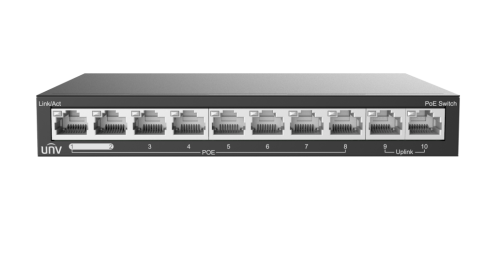
PoE სვიჩი - 8x100 მბ/წმ PoE (at/af) პორტი, 2x100 მბ/წმ, არამართვადი 60 ვტ


მართვადი PoE სვიჩი - CRS318, გარე გამოყენების, L3, 16P af/at, 2S+, MikroTik